Table of Contents >> Show >> Hide
- What Is the Dexcom G7 CGM?
- How the Dexcom G7 Works
- Key Features That Make the Dexcom G7 Stand Out
- Where You Wear It and What Setup Looks Like
- Who May Benefit From Dexcom G7?
- What the Readings Can Teach You
- Dexcom G7 and Automated Insulin Delivery
- Coverage, Prescription, and Cost Questions
- Pros of the Dexcom G7
- Potential Limitations to Know Before You Commit
- Practical Tips for New Dexcom G7 Users
- Experiences With the Dexcom G7 in Real Life
- Final Thoughts
- SEO Tags
If you have diabetes, you already know the routine: numbers, snacks, alarms, carbs, more numbers, and at least one moment a day where your glucose seems to have a personal grudge against you. That is exactly why continuous glucose monitoring has become such a big deal. And when people talk about modern CGM options, the Dexcom G7 is usually near the top of the conversation.
The Dexcom G7 CGM is designed to help people see glucose levels in real time, spot trends, and react faster to highs and lows. Instead of waiting for a fingerstick to tell you what already happened, the system helps you see where your glucose is now and where it may be headed next. That may sound simple, but in everyday life, that kind of insight can be the difference between feeling prepared and feeling like your pancreas left you on read.
This guide walks through what the Dexcom G7 is, how it works, who it may help, what daily use is really like, and what to think about before making the switch. It is written for real humans, not instruction-manual robots.
What Is the Dexcom G7 CGM?
The Dexcom G7 is a real-time continuous glucose monitor, or CGM. It uses a small wearable sensor to measure glucose in the interstitial fluid just under your skin. That information is then sent to a compatible smartphone, Apple Watch feature set when supported, or Dexcom receiver so you can view your glucose readings, trends, and alerts throughout the day.
In the United States, the standard Dexcom G7 system is cleared for people with diabetes ages 2 and older. It is intended to help with diabetes management and can also work with certain digitally connected systems, including some automated insulin delivery tools. In plain English, it is more than a number machine. It is part of a larger diabetes-tech ecosystem.
How the Dexcom G7 Works
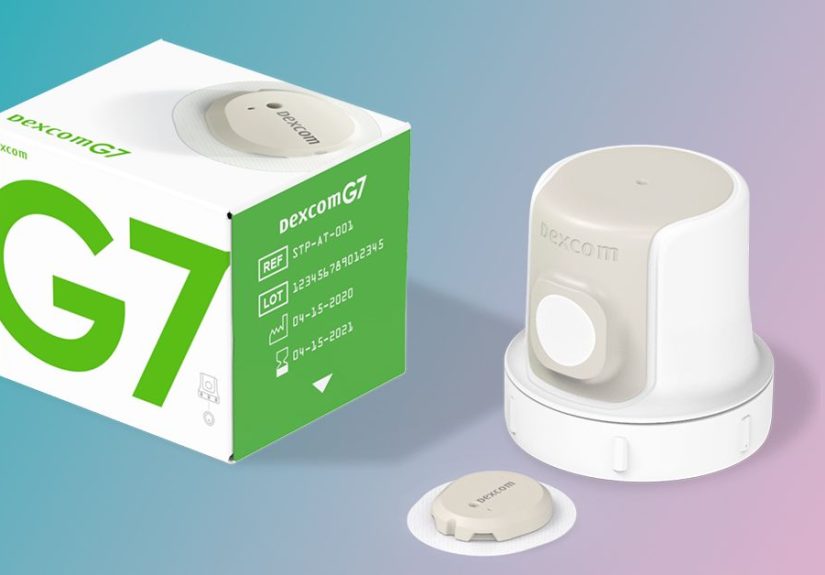
The G7 combines the sensor and transmitter into one all-in-one wearable. Once applied, it sends glucose readings every few minutes to your display device. That means you are not just getting a single snapshot. You are getting a moving picture of your glucose story.
That matters because diabetes management is rarely about one number in isolation. A reading of 110 can mean “all good” or “brace yourself” depending on whether your trend arrow is steady, rising, or dropping like a dramatic movie plot twist. The Dexcom G7 helps you see those changes as they happen.
The system is factory calibrated, which means routine fingerstick calibrations are not generally required. That said, fingersticks are still important in certain situations, such as when symptoms do not match what the CGM says, during warmup, or when the system does not show both a glucose number and a trend arrow.
Key Features That Make the Dexcom G7 Stand Out
1. Faster warmup
One of the biggest practical upgrades people notice is the shorter warmup time. The standard Dexcom G7 has a 30-minute warmup period, which is significantly more convenient than older systems that made users wait longer. Less waiting means less dead time without glucose data, and that is never a bad thing.
2. Up to 10 days of wear, plus a grace period
The standard G7 sensor is worn for up to 10 days, and it includes a 12-hour grace period at the end. That extra window is genuinely useful. Instead of changing your sensor at the worst possible moment, like during a commute, dinner, or while half-awake before coffee, you get a little flexibility.
3. Smaller, simpler design
The G7 is smaller than the older Dexcom G6 and folds the transmitter into the sensor itself. That cuts down on parts, simplifies setup, and makes the whole system feel less like a tiny home-improvement project attached to your arm.
4. Custom alerts and urgent warnings
The system can alert you when glucose is too high, too low, or predicted to go low soon. For many users, alerts are one of the most valuable features, especially overnight or during busy work and school days when checking a number every hour is not realistic.
5. Remote sharing
The Dexcom Share feature allows users to share glucose data with up to 10 followers through the Follow app. This can be especially helpful for parents of young children, partners, caregivers, or anyone who wants an extra layer of support. It is not about being watched every second. It is about having backup when it matters.
Where You Wear It and What Setup Looks Like
For most users, the standard Dexcom G7 is worn on the back of the upper arm. For children ages 2 to 6, the upper buttocks may also be used. The insertion process is designed to be straightforward, and Dexcom includes an overpatch to help keep the sensor in place.
The sensor is also waterproof within the product’s stated limits, which is good news for people who shower, sweat, swim, exercise, or generally refuse to live like a museum exhibit. Still, like most wearable tech, the adhesive may last better when treated kindly. Translation: rubbing it with a towel like you are polishing a car is not ideal.
You can use the G7 with a compatible smartphone, and some users also choose the receiver. Compatibility matters a lot. Before upgrading your phone or your operating system, it is smart to check whether your device is officially supported. Diabetes tech is impressive, but it can also be very picky, like a toddler with a specific spoon.
Who May Benefit From Dexcom G7?
The Dexcom G7 can be helpful for many people living with diabetes, including people with type 1 diabetes, people with type 2 diabetes who use insulin, and some people with type 2 diabetes who do not use insulin but still need closer monitoring. It may also be useful for those who experience hypoglycemia, have trouble sensing lows, want better time-in-range data, or need more detailed information to guide treatment decisions.
CGM use has become increasingly important in modern diabetes care because it provides more context than occasional blood sugar checks alone. Organizations like the American Diabetes Association and NIDDK emphasize that CGMs can support tighter day-to-day management, more informed lifestyle choices, and better pattern recognition over time.
That does not mean every person with diabetes needs the same device or the same strategy. But it does mean more people are realizing that “checking when I remember” is not the same as “understanding what is happening.” The G7 is built for that second goal.
What the Readings Can Teach You
A Dexcom G7 does more than flash numbers at you. It helps you learn patterns. Maybe your breakfast looks innocent but launches your glucose like a rocket. Maybe your afternoon walk does more for your numbers than your very sincere promise to “eat better tomorrow.” Maybe you drop low at 3 a.m. after intense exercise. A CGM can make those patterns visible.
That visibility can help with:
- spotting overnight lows or early morning rises
- seeing how meals affect you in real life, not in theory
- tracking exercise responses
- learning whether stress, illness, or missed sleep changes your glucose
- improving time in range over weeks and months
This is one reason many clinicians and patients now focus on trends and time in range, not just A1C. A1C still matters, but it does not show the full daily roller coaster. CGM data can.
Dexcom G7 and Automated Insulin Delivery
The G7 is also designed to communicate with certain connected diabetes devices, including some automated insulin delivery systems. Compatibility has expanded over time, and integrations with systems such as Omnipod 5 and Tandem pump platforms have made the G7 more appealing for people who want a more connected setup.
This matters because automated insulin systems rely on CGM data to help adjust insulin delivery. If you use a pump or plan to use one, compatibility should be part of your decision from day one. Never assume that every version of every device works together automatically. Diabetes tech loves details, and details love causing confusion.
Coverage, Prescription, and Cost Questions
The Dexcom G7 requires a prescription in the United States. Insurance coverage varies, and that is the part where things can get less “future of medicine” and more “please hold while we transfer your call.”
For Medicare, coverage may be available if you have diabetes, your clinician prescribes the device, and you meet eligibility requirements such as insulin use or a history of problematic hypoglycemia. Medicare guidance also makes it important to work with enrolled suppliers, and many users need to use the Dexcom receiver to maintain Medicare coverage for supplies even if they also view data on a smartphone.
For commercial insurance, coverage depends on your plan, diagnosis, treatment, and pharmacy or DME pathway. Without insurance, CGM costs can be high, so it is worth asking about manufacturer programs, pharmacy fulfillment, coupons, and other savings options.
Pros of the Dexcom G7
- real-time glucose visibility throughout the day and night
- short 30-minute warmup
- 10-day wear plus 12-hour grace period
- custom alerts for highs and lows
- factory calibration for routine use
- data sharing with family or caregivers
- growing compatibility with pumps and connected diabetes tools
- smaller all-in-one design than earlier Dexcom generations
Potential Limitations to Know Before You Commit
- adhesive issues can happen, especially with sweat, swimming, or sensitive skin
- smartphone compatibility is not universal
- alerts can feel lifesaving one day and mildly annoying the next
- CGM readings may lag behind blood glucose during fast changes
- you still need a blood glucose meter in some situations
- cost and coverage can be a real barrier
None of these downsides automatically make the G7 a bad fit. They just make it a real medical device used by real people in real bodies with real insurance headaches.
Practical Tips for New Dexcom G7 Users
Pick your timing wisely
Start a new sensor when you are not rushing. Doing tech setup while late, hungry, or annoyed rarely leads to personal growth.
Pay attention to trend arrows
The trend can matter as much as the number. A steady 90 is not the same as a fast-dropping 90.
Use alerts thoughtfully
Custom alerts should help you, not make you ignore your phone out of spite. Fine-tune them with your care team.
Keep backup supplies
Have your meter, test strips, chargers, and extra sensors ready. Diabetes enjoys terrible timing.
Review your data, not just your moments
Single readings are useful, but patterns are gold. Review trends weekly if you can.
Experiences With the Dexcom G7 in Real Life
In real-world use, the Dexcom G7 often changes how people think about diabetes. Not necessarily because it makes diabetes easy, because let’s not get carried away, but because it makes diabetes more visible. And visibility can be powerful.
Many new users describe the first few days with a CGM as eye-opening. Someone who used to check blood sugar four times a day suddenly realizes their glucose is rising after coffee, dipping during meetings, or climbing during stress even when food is not involved. It can feel like turning on the lights in a room you have been walking through for years.
Parents and caregivers often appreciate the sharing features most. Being able to follow a child’s readings remotely can reduce some of the constant uncertainty that comes with school days, sports, sleepovers, and nights when nobody is sleeping quite as peacefully as they pretend. That peace of mind does not eliminate worry, but it can lower the volume.
Adults with busy schedules often talk about the relief of seeing trends instead of guessing. A person at work can glance at a reading before a presentation. Someone driving can notice a downward arrow before a low becomes a problem. Someone exercising can learn which workouts cause drops and which ones lead to later spikes. Over time, the system can help turn “Why is this happening?” into “I have seen this pattern before.”
That said, real-life experiences are not all smooth sailing and motivational background music. Some users need time to get used to wearing a sensor on the back of the arm. Some notice that adhesive performance can vary depending on heat, sweat, skin prep, and activity level. Others find that app settings, notification permissions, and phone compatibility can be surprisingly important. There is nothing quite like realizing your diabetes technology is fine but your phone settings have quietly betrayed you.
There is also the emotional side. Seeing glucose data all day can feel empowering, but it can also feel like a lot. For some people, the constant stream of numbers creates anxiety at first. The trick is learning to use the information as a tool rather than a grade on your performance as a human being. A high reading is not a moral failure. A low is not proof that you did everything wrong. They are data points, not character references.
Over time, many users settle into a rhythm. They learn which alerts matter most, what meals tend to cause trouble, where the sensor sticks best, and when to double-check with a meter. That learning curve is real, but so is the payoff. For plenty of people, the Dexcom G7 becomes less of a gadget and more of a daily partner: small, imperfect, sometimes bossy, but often incredibly helpful.
Final Thoughts
The Dexcom G7 CGM is one of the most user-friendly diabetes devices currently available in the United States. It offers real-time glucose data, shorter warmup, flexible sharing, a smaller all-in-one design, and expanding compatibility with connected diabetes tools. For many users, it can improve awareness, confidence, and daily decision-making in a way that fingersticks alone simply cannot.
Still, the best CGM is not just the one with the flashiest features. It is the one that fits your body, your routine, your budget, and your treatment plan. If the Dexcom G7 sounds like a good match, talk with your diabetes care team and verify coverage, device compatibility, and training needs before you jump in.
Informational note: This article is for educational purposes only and is not a substitute for medical advice, diagnosis, or treatment.