Table of Contents >> Show >> Hide
- What “Google Next” Signals for Workspace in 2025 (and Beyond)
- The Headliner: Google Vids Joins Docs, Sheets, and Slides
- Two New Add-Ons: AI for Meetings vs. AI for Security
- Smaller Workspace Upgrades That Add Up
- Gemini Gets Closer to the Center of Workspace
- Security Reality Check: The Right Way to Adopt These Updates
- Pricing and the “Do We Really Need This?” Conversation
- What This Means for Teams: Specific, Practical Examples
- Real-World Experiences: What It’s Like When Teams Turn These Features On
- Conclusion
Google Cloud Next is the kind of conference where you show up expecting “cloud stuff” and leave with an existential
question like: “Wait… am I a video editor now?” This year’s biggest Google Workspace announcements weren’t
just shiny AI demosthey were practical upgrades aimed at the everyday chaos of work: messy meetings, sensitive files,
cross-border teams, and that one coworker who communicates exclusively in vague bullet points.
At Next, Google introduced a brand-new Workspace app (Google Vids), rolled out two paid AI add-ons that split “AI for
collaboration” from “AI for security,” and added a pile of smaller improvements to Docs, Sheets, Gmail, and Chat that
collectively add up to a very real shift in how Workspace wants you to work.
What “Google Next” Signals for Workspace in 2025 (and Beyond)
Next has become Google’s annual “here’s where work is headed” moment. The consistent theme: make AI feel less like a
separate tool you go visit (like a weird little robot in a side room) and more like something baked into the apps your
team already lives inGmail, Docs, Meet, Drive, and Chat.
But Google also knows there’s an enterprise-sized speed bump: security. So the announcements at Next didn’t just
celebrate productivity. They also focused on governance, classification, DLP controls, and safer ways to deploy AI
without turning your organization into an accidental leak factory.
The Headliner: Google Vids Joins Docs, Sheets, and Slides
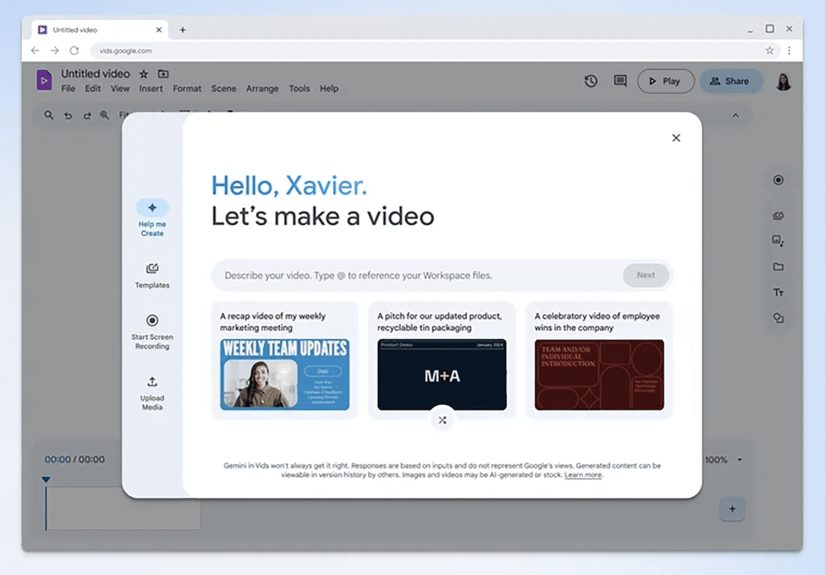
The biggest “new app” moment was Google Vids, an AI-powered video creation app designed for workthink
less “Oscar campaign” and more “HR onboarding that people might actually watch.” Google positioned Vids as a sibling to
Docs/Sheets/Slides, with browser-based collaboration and the same Workspace-style sharing controls.
So what does Vids actually do?
Vids is built around the idea that most workplace videos aren’t hard because video is hardthey’re hard because
starting is hard. You give it a prompt or pick a template, and it can generate a storyboard draft that you can edit.
It can also pull in suggested scenes from stock images/videos, add background music options, and help with scripts and
voiceover choices (including presets or your own voice).
- Use cases Google highlighted: pitches, training, onboarding, internal announcements, and “here’s what we shipped” updates.
- Collaboration angle: real-time co-editing and comments, without emailing giant video files back and forth.
- Rollout detail: announced at Next with early access via Workspace Labs starting in June (initial testing first, then wider availability).
Why Vids matters (even if your team “doesn’t do video”)
Every team does video nowthey just pretend they don’t. Sales records demos. Customer success explains features.
Operations trains new hires. Leadership posts all-hands recaps. Vids is Google’s attempt to make those videos feel as
easy to assemble as a slide deckespecially for people who don’t want to learn a “real” editing tool just to announce a
policy update.
The strategic point: if video creation becomes “as normal as making a doc,” more institutional knowledge can live in
richer formatswithout forcing your org to hire a full-time editor just to keep up.
Two New Add-Ons: AI for Meetings vs. AI for Security
Next also introduced two paid add-ons priced at $10 per user per month (each), letting organizations
buy specific AI capabilities without going all-in on the most comprehensive tier.
1) AI Meetings and Messaging add-on: Make Meet and Chat less exhausting
This add-on focuses on collaboration featuresespecially the parts of meetings people hate: taking notes, missing
context, and language barriers. At launch (and as features roll out), it includes Meet improvements such as studio
lighting/sound/look, generative backgrounds, real-time translated captions, and “Take notes for me” (announced as
coming in alpha/preview).
Google also described upcoming Chat upgrades tied to the add-on, including on-demand conversation summaries and message
translation later in the year.
- Translate for me: automatic detection and translation of Meet captions, supporting 69 languages (thousands of language pairs).
- Take notes for me: AI-generated meeting notes that help people focus on the conversation instead of playing stenographer.
- Meeting protection: features discussed for Meet include items like screenshare watermarking to discourage unauthorized sharing.
The practical impact is straightforward: teams waste less time translating, re-explaining, and rewriting what was said
five minutes ago. The risk is also straightforward: AI notes can be imperfect, so organizations should treat them as
drafts that still need human reviewespecially in compliance-heavy environments.
2) AI Security add-on: Make Drive less “Oops, that was confidential”
The second add-on is for organizations that want AI help protecting datanot just producing it. The headline feature is
AI Classification in Google Drive, which automatically identifies and labels sensitive files so admins
can apply existing controls more consistently at scale.
Google’s pitch is that the models are “privacy-preserving” and can be trained on data unique to your organization, so
your classification approach matches your policies instead of a generic template. Once files are labeled, you can tie
those labels into data loss prevention rules and other security workflows.
Translation: instead of relying on every employee to correctly mark “Sensitive – Do Not Share,” your admin team can
build a system that helps label content automatically, then enforce guardrails (sharing limits, warnings, audit rules,
and more) in a more repeatable way.
Smaller Workspace Upgrades That Add Up
The “new app + new add-ons” announcements got the spotlight, but Next also came with quality-of-life upgrades that
quietly fix real daily friction: organizing long Docs, wrangling data in Sheets, and turning rough thoughts into usable
writing from a phone.
Docs: Tabs (finally) and better personalization
Google announced tabs in Docs so a single document can hold multiple sections without forcing users to
maintain a chaotic folder of “Final_v7_REALFINAL_THISONE.doc.” Tabs were described as generally available in the coming
weeks after Next, along with personalization options like full-bleed cover images.
Sheets: New tables and conditional notifications
Sheets got a new tables feature aimed at formatting and organizing data with built-in structures and
templates (project trackers, event planning, and similar “please don’t make me design this from scratch” layouts).
Google also discussed conditional notificationsalerts triggered by changes like status updates.
Gmail: Voice prompting and “instant polish”
For people who live in Gmail on mobile (or who just think better out loud), Google added voice input for “Help me
write,” plus an “instant polish” option that turns rough notes into a more complete draft.
Chat: Bigger spaces and interoperability
Google also raised the ceiling on Chat spaces to up to 500,000 members and pushed messaging
interoperability with Slack and Microsoft Teams via a partner integrationan acknowledgement that most companies aren’t
magically going to use one chat app forever, no matter how many adoption posters you print.
Gemini Gets Closer to the Center of Workspace
One of the most important “more revealed at Next” threads is how Gemini is moving from feature to framework. Google
said Gemini is coming to Chat in preview to summarize conversations, answer questions, and act like an AI teammate
inside your collaboration streams.
Even more interesting for advanced teams: Google described using Vertex AI with Workspace as a platform
so organizations can bring custom models and workflows into the apps employees already use (Docs, Gmail, and beyond).
In other words, you can build business-specific AI experiences and surface them inside Workspacewhere the work
actually happens.
That matters because generic AI is usefulbut AI that knows your internal terminology, policies, and workflows is where
productivity starts to compound. (It’s also where governance becomes non-negotiable. More on that in a second.)
Security Reality Check: The Right Way to Adopt These Updates
If you’re rolling out new Workspace AI features, the best move is to treat it like any other powerful capability:
pilot, measure, govern, expand. The “AI Security add-on” is especially valuable if your organization is already
struggling with consistent data labeling and sharing rules across Drive.
What to do first (without making your IT team cry)
- Define a classification taxonomy: agree on labels like Public / Internal / Confidential / Regulated before you automate anything.
- Train models on representative data: classification is only as good as the examples you feed it.
- Attach controls to labels: connect labels to DLP rules (sharing restrictions, warnings, or blocking) instead of treating labels like decorative stickers.
- Set expectations about AI output: meeting notes and summaries should be reviewed, especially for legal, HR, or regulated conversations.
Google also emphasized ongoing security improvements around Gmail and Drive, including expanding DLP controls and
classification labels to Gmail in beta. That’s a big deal if your organization’s most sensitive information tends to
move through email first and “proper filing” second.
On the privacy front, Google maintains that its enterprise AI offerings are governed by Workspace privacy commitments,
with updated guidance describing how business and public sector customer data is handled when using Gemini in
Workspace. (Admins should still read and validate the details for their specific plan and region.)
Pricing and the “Do We Really Need This?” Conversation
The add-ons being priced at $10/user/month is both simple and sneaky. Simple because you can calculate
it in your head. Sneaky because that “tiny” number becomes a real line item at scale:
- 250 employees: $2,500/month per add-on, $5,000/month for both
- 2,000 employees: $20,000/month per add-on, $40,000/month for both
That doesn’t mean it’s not worth it. It just means the ROI needs to be tied to measurable outcomes:
fewer rework cycles, reduced meeting follow-up time, fewer data exposure incidents, faster onboarding, improved
accessibility, and less “please resend the deck” chaos.
What This Means for Teams: Specific, Practical Examples
HR and Learning & Development
Vids is built for the kind of internal content that’s too important to ignore but too boring to read. HR teams can
turn policy updates into short video explainers. L&D teams can build training modules that look more like modern
learning content and less like a scanned PDF from 2009.
Sales and Customer Success
Sales can use Vids to create quick, repeatable product explainers and pitch follow-ups without waiting on a creative
team. Customer success can convert support scripts or release notes into short walkthroughsespecially when the same
“how do I…” questions come up every week.
Global Operations
For distributed teams, Meet’s translation features can reduce friction in cross-language collaboration. Real-time
translated captions help people participate without needing to be fluentor pretending they are while silently
panicking.
IT and Security
AI classification is most valuable when your data is already sprawling and inconsistent. If your org has years of
unstructured Drive filescontracts, internal docs, customer listsautomatic labeling can help apply DLP rules more
reliably than “please remember to mark things correctly” ever will.
Real-World Experiences: What It’s Like When Teams Turn These Features On
Here’s what organizations commonly experience when these Next-era Workspace features move from announcement to
everyday reality. Not the glossy demo versionthe version where real people have deadlines, bad Wi-Fi, and an inbox
that reproduces overnight.
1) The “meeting notes honeymoon”… and then the accuracy conversation.
Teams usually love automated notes immediately. The first week feels magical: action items appear, late joiners get
caught up faster, and organizers aren’t stuck rewriting what everyone already said. Then someone notices a subtle
mistakean acronym misread, a decision summarized too confidently, or a “maybe” recorded as a “yes.” The best teams
respond by building a lightweight habit: treat AI notes like a draft, assign a human owner to skim them, and correct
anything important before it becomes “the official record.” That tiny check turns AI note-taking from risky to
reliably useful.
2) Video creation shifts from “special project” to “normal communication.”
When Vids enters the picture, the first wave of videos is usually internal: onboarding explainers, quarterly updates,
quick training clips, and “how we do this here” walkthroughs. The surprising part is how quickly video becomes a
default format once it’s easy. A marketing team might start using Vids for lightweight customer-facing snippets, but
the real transformation tends to happen in operational teamspeople who never wanted to open a professional editor
but absolutely do want to stop repeating themselves in meetings. A 3-minute video that answers the top five questions
can save hours of repetitive follow-up across a month.
3) Security teams finally get leverageif they plan the labels first.
AI classification feels powerful because it scales. But teams get the best results when they treat it as part of a
broader data governance project, not a magic button. The smoothest rollouts tend to start with two or three labels
that matter most (for example: “Customer Data,” “Financial,” “Legal/Contract”), then build DLP guardrails around those
labels (warnings, sharing restrictions, or approvals). Once the organization sees fewer “accidental overshares,” it’s
easier to expand the taxonomy. The messy rollouts are the ones where teams skip the label strategy and end up arguing
over what “Confidential” means in week three.
4) People adopt faster when the value is personal, not corporate.
The features that stick aren’t always the most “enterprise.” They’re the ones that make an individual’s day better:
translating captions so someone can contribute confidently, polishing an email from rough notes while walking between
meetings, or organizing a massive doc with tabs so it stops being a scroll marathon. When teams frame rollout messages
around these personal wins (“you’ll spend less time rewriting” instead of “we are modernizing collaboration”), adoption
usually climbs without a single forced-training slide deck.
Conclusion
Google Next made one thing clear: Workspace is evolving into a more AI-native productivity suiteone where creating
videos, summarizing collaboration, translating meetings, and classifying sensitive data can be part of ordinary work.
The win is speed and clarity. The trade-off is responsibility: organizations have to pair these capabilities with
smart governance, clear policies, and human review where it counts. Done right, the new Workspace apps and security
add-ons don’t just add featuresthey reduce friction in the places work usually falls apart.