Table of Contents >> Show >> Hide
- First, a Quick Reality Check: What “Hiding Highlights” Actually Means
- Method 1: Hide Highlights From Specific People (Best for “Not You, Brad”)
- Method 2: Make Your Account Private (Best for “Only People I Approve”)
- Method 3: Use Close Friends to Create “Semi-Private Highlights”
- Method 4: Make a “Hidden Highlight Vault” Without Deleting Anything (Yes, Really)
- Method 5: Remove the Highlight From Your Profile (But Keep the Stories)
- Method 6: Edit a Highlight Instead of Deleting It (Quiet Cleanup)
- Method 7: Camouflage (Not Hidden, Just Less Obvious)
- Which Method Should You Use?
- Troubleshooting: Common “Wait, Why Isn’t This Working?” Moments
- Privacy Mini-Checklist (Because Future You Will Be Grateful)
- Real Experiences: What Hiding Instagram Highlights Feels Like (and What People Learn the Hard Way)
- Experience 1: The “New School / New Job” Profile Clean-up
- Experience 2: The “One Specific Person” Situation
- Experience 3: The Close Friends Upgrade (From Chaos to Calm)
- Experience 4: The “I Don’t Want to Delete It, I Just Want It Gone” Moment
- Experience 5: The Camouflage Trick (Because Sometimes You Just Need Subtle)
- Conclusion
Instagram Highlights are like the “museum exhibit” version of your Stories: curated, organized, and sitting right under your bio where
visitors can judge your entire personality in eight seconds. (No pressure.) The problem? Sometimes your Highlights are less “timeless memories”
and more “why did I ever post that?”
The good news: you can hide Instagram Highlights without permanently nuking your memories. The slightly-annoying news: Instagram doesn’t offer a
single magic button labeled “Make This Disappear From My Profile But Still Exist In My Heart”. So we use the tools Instagram does give us:
story visibility controls, Close Friends, private account settings, and the Story Archive.
This guide walks you through the best real-world methods (with specific examples), what each method does, and which one to choose depending on whether
you’re trying to hide Highlights from one person, some people, or everyone except you.
First, a Quick Reality Check: What “Hiding Highlights” Actually Means
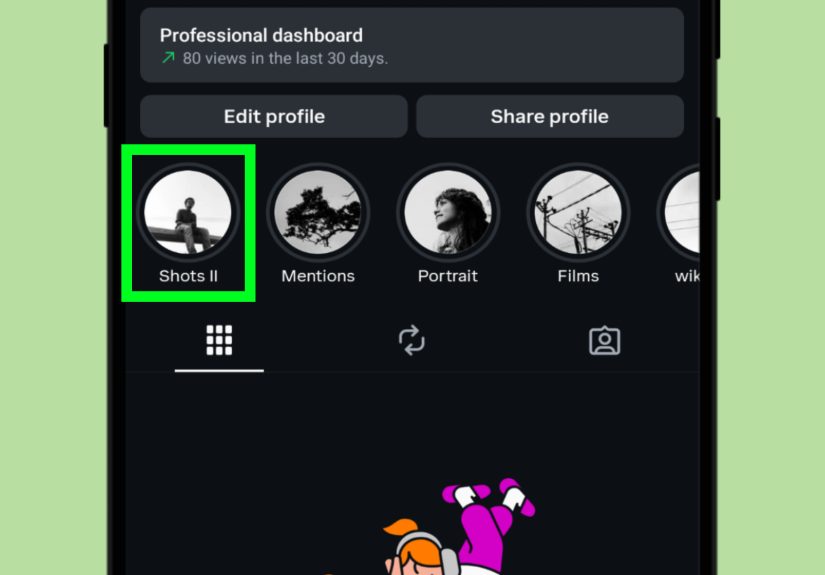
Instagram Highlights are made from Stories you’ve posted (and saved in your Story Archive). They stay visible on your profile until you remove them.
That means “hiding” a Highlight usually falls into one of these buckets:
- Hide from specific accounts (your profile stays public or privateyour choice).
- Limit to approved followers (private account).
- Limit to Close Friends (a smaller audience).
- Remove the Highlight bubble from your profile while keeping the Stories saved in your Archive (so you can rebuild later).
- Camouflage (not truly hidden, but less noticeable at a glance).
You can mix-and-match these approaches depending on your comfort level and how much effort you want to spend tapping tiny circles on your phone screen.
Method 1: Hide Highlights From Specific People (Best for “Not You, Brad”)
If you want your Highlights visible to most people but not a particular person (or a few), the cleanest approach is to use Instagram’s Story privacy setting:
Hide Story (and Live) From.
Why it works: Highlights are Stories saved to your profile. If someone can’t view your Stories, they also can’t view Story content saved as Highlights.
Think of it like locking the door to the same roomeven if you redecorate.
Step-by-step (iPhone and Android)
- Go to your Profile.
- Tap the three lines (menu) in the top-right.
- Tap Settings and privacy.
- Tap Privacy.
- Tap Story (sometimes labeled Story and live depending on your app version).
- Tap Hide story from (or Hide story and live).
- Select the accounts you want to hide from.
What this changes (and what it doesn’t)
- They won’t see: your current Stories and any Story content saved as Highlights.
- They still will see: your posts, Reels, and profile info (unless you also change those settings or go private).
- They are not notified you hid anything. They just… mysteriously stop seeing your Stories.
Example: Hiding a “Travel 2022” Highlight from your coworkers
Let’s say your “Travel 2022” Highlight includes beach clips that are perfectly innocentexcept you called in “sick” that week. Add your coworkers to
Hide story from and that Highlight becomes invisible to them while everyone else can still view it.
Pro tip: If you only need to hide Highlights from one or two people, this method is fast and doesn’t mess with your entire account.
Method 2: Make Your Account Private (Best for “Only People I Approve”)
If your account is public, anyone can view your profileincluding your Highlights. Switching to a private account makes your Highlights visible only
to approved followers.
How to switch to private
- Profile → Menu (three lines) → Settings and privacy
- Tap Account privacy
- Toggle Private account on
When private is the right move
- You don’t want strangers (or random search traffic) viewing your Highlights.
- You’re okay approving followers manually.
- You want a broad privacy upgradenot just a Highlight fix.
Downside
If the people you want to hide from are already following you, going private doesn’t automatically remove them. You’d need to remove them as a follower
(or block/restrict) to stop access.
Method 3: Use Close Friends to Create “Semi-Private Highlights”
Instagram’s Close Friends feature lets you share Stories with a smaller list rather than everyone. When a Story is shared to Close Friends,
only that list can view itmeaning if you add that Story to a Highlight, the Highlight content stays limited to the same audience.
This is perfect when you want the Highlight to exist on your profile, but only for a trusted group (besties, family, your group chat that never lets anything die).
Set up Close Friends
- Profile → Menu (three lines) → Close Friends
- Add people you trust.
- Tap Done (or create/save your list).
Post a Story to Close Friends (then add it to a Highlight)
- Create a Story as usual.
- Choose Close Friends as the audience (green star / green ring indicators).
- After posting, tap Highlight on the Story and add it to a Highlight (new or existing).
Example: A “Family” Highlight that isn’t for your entire follower list
Want to keep a “Family” Highlight but don’t want acquaintances watching your holiday dinner like it’s a nature documentary? Add only your family members
to Close Friends, post Stories to Close Friends, then save them into a “Family” Highlight.
Method 4: Make a “Hidden Highlight Vault” Without Deleting Anything (Yes, Really)
If your goal is: “I want to keep these Highlights, but I want basically nobody to see them”, here’s the most practical approach
without deleting your Stories:
Option A: Close Friends Vault (Minimal audience)
Keep your Close Friends list extremely smallsome people use just one trusted person or an alternate account they control (if they have one). Then:
- Post Stories to Close Friends.
- Add them to a Highlight (like “Vault” or “Private”).
- Result: the Highlight exists, but only your Close Friends list can view the content.
Important: You can’t add yourself to Close Friends (Instagram assumes you’re already your own close friend… emotionally, at least).
If you want to test visibility, you’ll need a second account or a trusted friend to confirm what they can/can’t see.
Option B: Separate “Vault Account” (Best for maximum privacy)
Some people create a separate private account just for archivesthink “digital scrapbook.” This is the cleanest way to keep Highlights away from your main
profile while still organizing them into Highlights.
- Make the vault account private.
- Only approve yourself (and maybe one backup account).
- Repost your favorite Stories there (or share to that account) and keep Highlights organized.
If your main account is public-facing (creator, student clubs, sports team, portfolio vibes), a vault account keeps things tidy without “deleting your past.”
Method 5: Remove the Highlight From Your Profile (But Keep the Stories)
This method is for people who want the Highlight bubble gone from their profilebut do not want to lose the underlying Stories.
Here’s the key detail: deleting a Highlight removes the Highlight collection from your profile, but your Stories can still remain saved in your
Story Archive (as long as Story Archive is turned on). That means you can rebuild the Highlight later.
Step-by-step: Delete the Highlight (stories can remain archived)
- Go to your profile.
- Tap and hold the Highlight you want to remove.
- Tap Delete Highlight.
- Confirm.
Before you do this: make sure Story Archive is ON
If you want your Stories preserved for future rebuilding, check your archive settings:
- Profile → Menu → Settings and privacy
- Search or navigate to Archiving (or Story settings)
- Make sure Save story to archive is enabled
Rebuild later (when you’re ready)
- Go to your profile.
- Tap the + under Highlights (New Highlight).
- Select Stories from your Archive.
- Name it, choose a cover, and save.
Think of this as “putting your Highlight in storage.” The shelf is empty, but the boxes are still in the garage.
Method 6: Edit a Highlight Instead of Deleting It (Quiet Cleanup)
Sometimes you don’t need to hide the entire Highlightjust remove a few Stories that no longer spark joy (or that spark mild panic).
Editing a Highlight lets you remove specific Stories from it while keeping the Highlight alive.
How to remove specific Stories from a Highlight
- Tap the Highlight on your profile.
- Tap More (bottom-right) or the menu option.
- Tap Edit Highlight.
- Uncheck/remove the Stories you don’t want in that Highlight.
- Tap Done.
Example: Keeping “Fitness” but removing the “3 a.m. energy drink era”
You can keep your Fitness Highlight for the useful stuff (workouts, recipes, running progress) and quietly remove the questionable “pre-workout review”
Story from 2023 that you filmed like a ghost-hunting documentary.
Method 7: Camouflage (Not Hidden, Just Less Obvious)
If you don’t want to change privacy settings (or delete anything), you can make a Highlight less noticeable.
This won’t stop someone from tapping it, but it can reduce “drive-by curiosity clicks.”
Camouflage ideas
- Rename it to something boring like “Archive” or “Misc.”
- Use a neutral cover (solid color, simple icon, no faces).
- Move it back in the order by updating other Highlights so it appears later (people tap the first few more often).
- Split it into smaller Highlights (less tempting than one big “Everything About Me” button).
Camouflage is basically the social media version of putting your snacks in a container labeled “Quinoa.”
Which Method Should You Use?
If you want to hide Highlights from one specific person
- Use Hide story from (Method 1).
If you want to hide Highlights from strangers
- Switch to a private account (Method 2).
If you want a Highlight only a small group can see
- Use Close Friends (Method 3).
If you want the Highlight bubble gone but still want your Stories saved
- Delete the Highlight and rely on Story Archive to rebuild later (Method 5).
If you just need to remove a few embarrassing clips
- Edit the Highlight (Method 6).
Troubleshooting: Common “Wait, Why Isn’t This Working?” Moments
“I hid my Story from someone, but they still see some Highlights.”
Double-check that you hid your Story from the correct account (people sometimes have multiple accounts). Also note that older Highlights may contain
content posted with different visibility settings. If you want airtight privacy, combine Method 1 with Close Friends going forward.
“I deleted a Highlight and now I can’t find the Stories.”
If Story Archive is enabled, your Stories should still be in your Archive. If Archive was turned off at the time you posted, those Stories may not be saved.
Turn Archive on now so future Stories are preserved.
“Can I hide Highlights from everyone but still see them myself?”
Instagram doesn’t currently offer a perfect “Only Me” Highlight mode on your main profile. The closest practical solutions are:
- A Close Friends vault with a very limited list (Method 4A)
- A separate private vault account (Method 4B)
- Removing the Highlight bubble and relying on Archive (Method 5)
Privacy Mini-Checklist (Because Future You Will Be Grateful)
- Turn on Story Archive so you always have a backup.
- Review “Hide story from” occasionally (people change usernames; life gets messy).
- Use Close Friends for anything that would feel weird being watched by acquaintances.
- Remember: if someone already saw it, you can’t un-see it for them. (If only.)
Real Experiences: What Hiding Instagram Highlights Feels Like (and What People Learn the Hard Way)
Hiding Highlights is one of those oddly emotional internet chores. It starts as “let me tidy my profile,” and five minutes later you’re staring at a
2019 Story caption like it’s evidence in a courtroom drama. Here are real-life style scenarios (and the practical lessons that usually come out of them).
Experience 1: The “New School / New Job” Profile Clean-up
A lot of people hide Highlights when they’re starting a new chapternew school, new team, new job, or even just a new friend group. The first instinct
is often to delete everything. But after the panic fades, most people realize they don’t actually want to erase memories; they just want to stop leading
with them on their profile. That’s where deleting the Highlight bubble (but keeping Stories in Archive) feels like the healthiest option. You’re not
pretending your life didn’t happenyou’re just not pinning it to the front door.
Practical lesson: before you remove anything, check that Story Archive is enabled. People who skip this step sometimes discover their “backup plan”
was actually just a vibe.
Experience 2: The “One Specific Person” Situation
Sometimes the reason is very specific: an ex, a nosy classmate, a relative who loves opinions, or a follower who makes your stomach drop every time they
watch your Story. In these cases, the Hide Story setting feels like a quiet boundary that doesn’t start a public feud. Nobody gets a notification. Nobody
gets a dramatic announcement. Your Highlights just become invisible to that person.
Practical lesson: make sure you’re hiding the correct accountsome people have a main account and a “private” account. If you hide one but not the other,
it can feel like your privacy settings are “broken” when they’re actually just incomplete.
Experience 3: The Close Friends Upgrade (From Chaos to Calm)
Once people start using Close Friends, many don’t go back. It’s the difference between speaking on a stage and talking at a table. The Stories feel more natural,
and Highlights become more purposeful. Instead of one “Everything” Highlight, people often end up with a small Close Friends Highlight that’s basically a
mini scrapbookfamily updates, inside jokes, or personal milestones.
Practical lesson: keep your Close Friends list intentional. It’s tempting to add more people over time, but the whole point is that it’s a smaller circle.
If you’re unsure, err on the side of fewer people. You can always add someone later; it’s harder to un-share what you already shared.
Experience 4: The “I Don’t Want to Delete It, I Just Want It Gone” Moment
This is the most common feeling: you don’t hate your Highlight, you just don’t want it sitting under your bio like a billboard. People often land on
the same solution: delete the Highlight collection, rely on Story Archive, and rebuild only if needed. It’s surprisingly freeing. Your profile becomes
more “current,” and you still keep your memories.
Practical lesson: treat Highlights like a homepage, not a hard drive. Your hard drive is the Archive. Your homepage should be what you want visitors to
see first.
Experience 5: The Camouflage Trick (Because Sometimes You Just Need Subtle)
Not everyone wants to flip privacy settings or start a vault account. Some people just want a Highlight to stop screaming for attention. Changing the cover,
renaming it, and pushing it later in the order can reduce random taps. It’s not “hiding,” but it’s a practical compromise when you want low effort with
decent results.
Practical lesson: camouflage works best for Highlights that aren’t sensitivejust outdated or irrelevant. If you truly need privacy, use Hide Story or
Close Friends instead of hoping nobody clicks.
Conclusion
Hiding Instagram Highlights without deleting them is totally doableyou just have to choose the method that matches your goal. If you’re hiding from one
person, use Story privacy settings. If you’re hiding from the public, go private. If you want a smaller audience, use Close Friends. And if you want the
Highlight bubble off your profile while keeping your memories, delete the Highlight and rely on Story Archive so you can rebuild later.
Your profile should work for you, not the 2018 version of you who thought neon text and shaky concert videos were a lifestyle.